Friday, 29 November 2013

How To Boot Your Android Device or Tab Into Safe Mode For Troubleshooting


There are times you
install some
applications
on your android device
and suddenly it begins
to malfunction or
refuse to boot up.
Safe
mode is a great tool
that you can use to
troubleshoot these
issues. Safe mode
boots your phone
running only the apps
that came with the
phone – that means
no


third-party apps. From
safe mode, you can
uninstall any app you
want to.
Unfortunately, not all
phones have the same
method to enter safe
mode. Most Jelly Bean
devices use the first
method below, but
some devices with
older
versions of Android
and
some newer devices
(like the Galaxy S 4 and
HTC One) use the
alternate method
further down the
page.

How Can I Boot My Phone To Safe
Mode?


Below Are Steps To Activate It VIZ::

1. Hold down the
physical power button
on your device.

2. Long-press the
“Power off” option
that
appears

3. A dialog box asking
you if you want to
reboot to safe mode
may pop up. Tap OK

4. When the phone
reboots, you should
see
a “Safe Mode”
watermark at the
bottom left of the
screen, to let you
know
that you are in fact in
safe mode.

Alternate Method
(some older versions
of Android and some
Jelly Bean phones)::

1. Turn off your phone.

2. Once your phone is
off, turn it on by
pressing the power
button.

3. As your phone is
booting, hold down
both
the volume up and
volume down buttons
(yes, both) and keep
them held.

4. Once your phone has
booted, you should
see
a “Safe Mode”
watermark at the
botom left of the
screen, to let you
know
that you are in fact in
safe mode.

Note:
If the alternate
method also doesn’t
work, you can try
holding down menu
instead of volume up
and down while
booting.

Please always
remember that any
app
you download can
easily
be uninstall from safe
mode most especially
if
the app freezes, or
refuse to boot up your
android device.

To exit safe mode,
you
just restart your
device
as you normally would.

::Hope This Helps
Pals??

HOW TO HOST A WEBSITE OR FILE ON GOOGLE DRIVE


Do you have a presentation or a complex JavaScript based web apps you want to showcase? Then, you can take the advantage of Google free CDN service. Google has several servers across the globe and we can be sure that a file downloaded from Google server will be much faster compare to our shared hosting server. But there's a little drawback. Google Drive websites have a URL structure like googledrive.com/host/ and there’s no way to change the default URL.

For instance, if your are hosting a website on Google Drive but wish to serve it under your own custom domain, that’s not possible yet unless you wrap your Google Drive website URL inside an iframe tag as shown in the following snippet:


<html>
 <head>
  <style>
 .body { margin: 0; padding: 0;}
 .iframe { position: absolute; height:100%; width:100%;}
 </style>
 <title> Google Drive Website </title>
 </head>
 <body>
 <iframe src = "https://googledrive.com/host/FILE-ID/" frameborder= "0"></iframe>
 </body>
 </html>

You can see a live demo of a static webpage hosted on Google Drive here

This guide assumes you already have some HTML content you’d like to publish. Now let's get these done.

1.  Login to drive.google.com
2.  Select Create > Folder


3.  Give your folder any title you like
4.  Now that a new folder is created. Select the check box next to the folder
5.  Select the Share settings icon


6.  In the next pop up window, click on "Change" under "Who has access" section.


7.  Make your folder "Public on the web", Save your changes, then click Done.
8.  Open your newly created folder and you can see it's empty. It's time to upload your files.
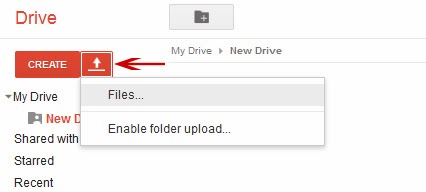
9.  Click the "Upload" icon, then "Files"


10.  Open your uploaded file and click the "Open" with Google Drive Viewer button below the page.


Click "Preview". The string of characters after "host" in your address bar is your page id. You can share the page URL with anyone.


As the owner of the account, you can access (and edit) your files via http://drive.google.com/page-id
Visitors can access it via http://googledrive.com.com/page-id                                
You might also like:

How to install Android Apps straight to your Blackberry

Hope you've heard about the latest
Blackberry 10.2.0.424 firmware
upgrade yeah its awesome, I think
Blackberry is really coming up, with the
upgrade your Blackberry 10 device can
accept and install any android file
without slide loading the Android App
using DDPB software
Here is How
If you have upgraded to the latest OS
version 10.2.0.424
Download Runtime unlocked version
10.2.1.13
Click HERE to Download

When the file is extracted, you will find
two BAR files that will be slide load on
our device using the slide load DDPB
method, or using any of the BB10 slide
loading Tool, or you can even use the
App Manager of Google Chrome
methods to load the app.
After you have installed the two files of
the Runtime Unlocked on your device,
simply reboot your device Now you can
start installing Android applications
without slide loading.
Learn more About slide loading Here
Hope it Helps....please use the share
button to share this post with your
friends.

HOW TO RE-PARTICPATE GOOGLE ADSENSE AFTER BEEN DISAPPROVED


Everyone knows about AdSense behaviour towards Website/blogs who do not follow their terms & privacy policy. If you do so, You will get banned to your website, Banned means you can not use AdSense ads again on your website & It can even de-indexed from Google search.

Before some days ago, we have posted a post about How to check whether your website is banned or not?. This post will help you to check Banned website by Adsense. If your website is banned, then i can hope the below steps may help you to Unbanned your website from AdSense.
Send an Google Reconsideration Request to AdSense
You can send Google a Reconsideration request if your website is de-indexed from google search, Just search site:yourdomain.com in Google. If it result in no pages found then you can go for reconsideration request from http://support.google.com/webmasters/bin/answer.py?hl=en&answer=35843
Be Relax & Polite
Google Consideratin form will ask for more about what happened: what actions might have led to any penalties, and what corrective actions have been taken. If you used a search engine optimization (SEO) company, please note that. Describing the SEO firm and their actions is a helpful indication of good faith that may assist in evaluation of reconsideration requests, etc
Verify the Website
Now, login to your Google webmaster account and add and verify your site. Make sure you have filled reconsideration form after verifying your website/Blog. Also You can send the information in an email to help@google.com. This is where Google representatives give support to customers.
Are you a Spammer?
(If your blog is de-indexed from Google) Some time Google ban those who spam lot aroud through paid links, malware etc. “Webspam” refers to pages that try to trick Google into ranking them highly. Just report to Google if you are not.
Be ready with Proof
You need real proof for Google re-inclusion, not just blame or acting stupid. Show them the proof of the changes you made for Google reconsideration. And at last, always be considerate and thank them for the time and effort that they are taking to look into your reconsideration request to Google and help you to solve the problems.
Be Relax & Keep patient
Be patient Because Google will take some time to Unbanned you from its records, It may take 1 week to 6 month depending upon your situation.
If you follow each steps carefully & cleverly then you may unbanned your banned website / Blog from Google AdSense. Comment your if your Blog ever Banned by Google?

Friday, 15 November 2013

IYAYI’S FAMILY BEGS ASUU TO CALL OFF STRIKE, REFUTES N50B DEMAND FROM KOGI GOV

THE family of the late former President of the Academic Staff Union of Universities (ASUU), Prof. Festus Iyayi, yesterday,
disassociated themselves
from the N50billion demand
from the Kogi State
government over the death
of their son, saying that no
amount of money can
compensate for the loss.

Meanwhile the Coalition to
Save Nigeria (CSN) has
appealed to the striking
ASUU members to call off
the strike action as a mark of
respect for Prof.Iyayi.
It would be recalled that the
Onojie of Ugbegun, home
town of late Prof Iyayi, had
demanded the sum of
N50bilion as compensation
for the death of their son.

TEARS FOR IYAYI—Relations
and sympathisers console
Mrs Grace Iyayi (4th L),
widow of former president
of ASUU, Late Prof. Festus
Iyayi at Ekosodin in Benin
City. Photo: Barnabas
Uzosike.

However, Prof. Robert
Ebewale, a cousin to the
deceased, told Vanguard
yesterday that it was
embarrassing to try to
equate the life of Prof Iyayi
with money, saying that the
family was embarrassed
with N50billion demand.

“No amount of money can
be compared with the life of
that calibre of person, so we
want to disassociate our
family with that. It is
embarrassing to us,” he
stated.

Meanwhile, the Coalition to
Save Nigeria (CSN) received
with shock the death of
Prof. Iyayi, Prof. Iyayi was an
accomplished academic,
author and unionist and a
detribalized Nigerian who
gave voice to the voiceless
and defended the
defenceless against
arbitrariness and impunity
by our public officers.

“With his death, the
Nigerian revolutionary
movement has been
decapitated as Prof. Iyayi
was one of the movement’s
brain boxes in the struggle
for a better Nigeria where
equity, fairness and justice
will reign. We have lost a
committed comrade and an
icon of the struggle for an
egalitarian Nigeria. He was a
true and authentic comrade
who devoted his entire life
to the struggle and died
fighting for educational
justice for the present and
future generations of
Nigerian students,” it stated.

The statement added: “We
call on ASUU and the federal
government to speedily
resolve the remaining grey
areas in their disagreement
to enable the suspension of
the current ASUU strike as a
mark of respect to Prof.

Iyayi”.

UEFA RANKING OF TOP 10 BESTPLAYERS (LATEST) !!!!

9. Robin Van Persie
8. Robert Lewandowski
7. Andres Iniesta
6. Bastian Schweinsteiger
5. Gareth Bale
4. Arjen Robben
3. Franck Ribery
2. Lionel Messi
1. Cristiano Ronaldo
*how I wish my super -hero emerge the ballon- d'or* star MESSI i rep*

Iyayi's funeral fixed for 1st of December, 2013

The funeral of former Academic Staff Union of Universities (ASUU) president who was recently killed in an auto crash, Prof. Festus Iyayi, has been fixed for the first week of December, a member of the family, Prof. Robert Ebewele, disclosed in Benin yesterday.

Ebewele who stated this when the pro-chancellor of the University of Benin (UNIBEN) Sen. Effiong joystickson Bob paid the family a condolence visit said the family would liaise with the university community for the burial arrangements.

ASUU President Nasir Fagge was among the visitors to the family yesterday to condole them. Earlier, Sen. Effiong who was led on the visit by the Vice Chancellor, Prof. Osayuki Oshodin, said he was deeply hurt over the sad incident.